Monday, November 17, 2008

Microsoft Office SharePoint Server for Developers

As a developer, would you like to learn more about Microsoft Office SharePoint Server (MOSS)? MOSS is based on Microsoft Windows SharePoint Services, which gives developers the opportunity to get more problems solved with less effort.

Windows SharePoint Services 3.0 takes full advantage of Microsoft ASP.NET and the Microsoft .NET runtime. The new features and added programmability support in MOSS provide a wealth of development opportunities. This course will immerse you in many of the developer-centric capabilities of Microsoft Office SharePoint Server.

image

You learn following topic

Level 1: Web Parts
Did you know that in SharePoint you can build pages as easy as in ASP.NET – and allow end users to create dashboards? Web parts allow for creating components of Web user interface that can be reused on multiple Web pages. These are introduced in ASP.NET and built on in SharePoint where they can be added to pages by end users and managed by IT Professionals. In this topic you will learn about building simple Web parts for SharePoint and how to connect them back to SharePoint site data.

Level 2: Data Lists
Did you know that SharePoint developers can work with data from lists that users get access to too? Data lists provide data storage for end users in SharePoint. End users can create lists with schema all through the SharePoint user interface and they can create, edit, and view the data. All of this data can be programmatically accessed by developers and this topic is all about that.

Level 3: Event Handlers
Did you know that SharePoint developers can automatically process data that your users upload via a spreadsheet? Event handlers (or event receivers) are custom code that runs on the SharePoint server in response to something that happens on the server. Event handlers can be useful for running business logic in response to data being added to the site. This topic shows how to create simple event handlers and investigates ways that event handlers can be used in SharePoint.

Level 4: Workflow
Did you know that you can write WF workflows in SharePoint without having to worry about storage, persistence, or how to interact with the user? Workflow in SharePoint allows for implementation of processes that require interaction such as email approvals or form completion by people in your organization. This topic shows you how to create simple workflows in SharePoint using Visual Studio that involve approvals from people by email and for meeting room resource bookings with an administrator.

Level 5: Silverlight Web Parts
Did you know that you can build rich Internet applications with SharePoint? Silverlight is a new Web user interface technology from Microsoft that allows for each implementation of animations and videos. This topic shows how a SharePoint user interface can be enhanced by using Silverlight in Web parts as part of a SharePoint site.

To Sign up visit : http://msdn.microsoft.com/en-us/rampup/dd221355.aspx

Wednesday, November 12, 2008

Microsoft Certified Master: Microsoft Office SharePoint Server 2007

The Microsoft Certified Master: Microsoft Office SharePoint Server 2007 program provides the most in-depth and comprehensive training available today for Office SharePoint Server 2007. This three-week training program is delivered by recognized experts from Microsoft and Microsoft partner organizations.


Prerequisites

Applicants must meet or exceed the prerequisite requirements for their chosen program track in order to be accepted into the Microsoft Certified Master program. Required exams and certifications will be verified.

Experience (Two or more years of hands-on experience)

There are two options: Microsoft SharePoint Portal Server 2003 and Microsoft Office SharePoint Server 2007 option:

OR

Content Management Server 2002 and Microsoft Office SharePoint Server 2007 option:

Successful completion of the following exams and certifications

Exam 70-630: TS: Microsoft Office SharePoint Server 2007, Configuring (for IT professionals)

Exam 70-631: TS: Windows SharePoint Services 3.0, Configuring (for IT professionals)

Exam 70-541: TS: Microsoft Windows SharePoint Services 3.0 – Application Development (for developers)

Exam 70-542: TS: Microsoft Office SharePoint Server 2007, Application Development (for Developers)

Pricing structure

Nonrefundable program application fee: US$125
Program fee: US$18,500
Non-lab exam retakes: US$250
Lab exam retakes: US$1,500

More details click here

Download document library as a zip

What a cool feature release by Mohamed Zaki (MVP)  an open source tool which allows users to download an entire document library as a zip file.

The new menu added to the sharepoint document library actions menu
y1pqg86rohb_xWpz7PN1EiUWDDD8HHQyvzxBKUlOo8Vel75GumkcdmFy6S5o8_3VLi0EH0YFYb1o7kTo Learn more about Take a look at his blog post about it.

Tuesday, November 4, 2008

Office Service Pack team announce that Service Pack 2 (SP2) for the 2007 Microsoft Office system

Office Service Pack team announce that Service Pack 2 (SP2) for the 2007 Microsoft Office system is expected to be released in the near future.  the exact release date, it will around February to April of 2009

The list given below,

For Office Desktop Programs:

  • · Improved Outlook Calendaring Reliability
  • · Improved Outlook Performance
  • · Enabling Object Model support for Charts in PowerPoint and Word
  • · Improved cryptographic functionality by supporting all cryptographic algorithms offered by the operating system
  • · Improved functionality in Excel’s charting mechanism
  • · Ability to ungroup SmartArt graphics (and as a result, the ability to add animations to them in PowerPoint)
  • · Ability for Visio to export UML models to an XML file compliant with the XMI standard
  • · Tool that enables the uninstall of Office client Service Packs

For Servers:

  • · Performance and manageability improvements to variations in Enterprise Content Management (ECM) including STSADM commands for repairing links between source and target pages
  • · Improvements around processing status approvals from Office Project Web Access into Office Project Professional 2007
  • · Improvements to read-only content databases and index rebuild timer jobs in Windows SharePoint Services 3.0

Personally I disappoint that SP2 dose not include Wiki (Comments, Star Rating), Blog (Tag, Start Rating) and WebParts for Shared Calendar enhancements

Sunday, November 2, 2008

Windows Azure offers SharePoint Service

The Azure™ Services Platform (Azure) is an internet-scale cloud services platform hosted in Microsoft data centers which offers cloud applications ready for consumption by customers such as Windows Live™, Microsoft Dynamics™, and other Microsoft Online Services for business such as Microsoft Exchange Online and SharePoint® Online.

The Cloud Computing and Services Platform Diagram

For details visit @ What Is the Azure Services Platform?

Wednesday, October 29, 2008

Application Architecture Guide 2.0 - Beta 1

Microsoft provides principles, patterns, and practices for designing application architectures on the .NET platform. It’s a principle-based approach. The overall guide to accomplish the following :

  • • To help you design more effective architectures on the .NET platform.
    • To help you choose the right technologies
    • To help you make more effective choices for key engineering decisions.
    • To help you map appropriate strategies and patterns.
    • To help you map relevant patterns & practices solution assets.

image

This guide is useful to anyone that cares about application design and architecture. The primary audience for this guide is solution architects and development leads but any technologist who wants to understand good application design on the .NET platform can get value by reading it.

To download visit patterns & practices Application Architecture Guide 2.0 - Beta 1

How to use Calculated value column

This article focus on three SharePoint functionality.

  1. 1.) How to use Calculated value column.
  2. 2.) How to format text using LOWER() and PROPER () functions.
  3. 3.) How to Merge two column value.

Let's begin, We seen from our past experience that, Individual users use to enter data their own style or non-standard format. Since this is part of end users habit, its very difficult to train everyone in the organization.

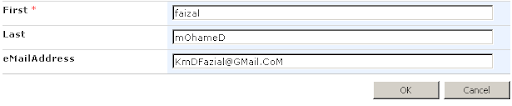
Given below example shows how end user's entered SharePoint contact list information.

User Data Input

image

SharePoint List View

image

Above scree shots show that the data entered inconsistence way and display in same manner.

Since this known problem in the industry we need to manage these issue.

Let's see how can manage below requirements

  1. 1.) Display eMail Address to lower case,
  2. 2) Merge First and Last name and Display as Full Name.

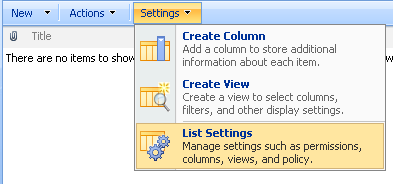
SharePoint : Go to Contact List and Click Settings and then Click List Settings.

image

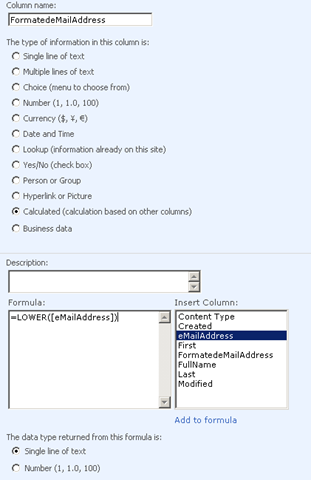
Create new column called "FormatedeMailAddress" and click "Calculated" On Formula text box type following formula.

=LOWER (eMailAddress)

image

Save and Go back to Contact List view you can see the email address display on Lower case format.

image

Let us look how to merge two column value "First and Last" as "Full Name" and format text in to proper case.

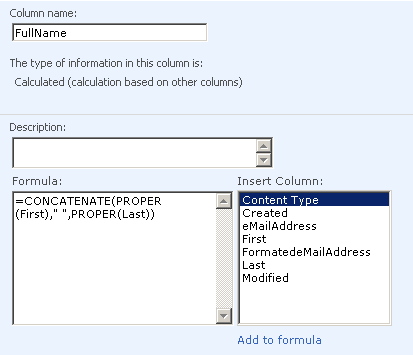
SharePoint : Go to Contact List and Click Settings and then Click List Settings. Create new column called "Full Name" and click "Calculated" On Formula text box type following formula.

image

=CONCATENATE(PROPER(First)," ",PROPER(Last)) 

Save and Go back to Contact List view you can see the email address display on Lower case format.

image

CONCATENATE () - Joins several text strings into one text string.

PROPER() - Capitalizes the first letter in a text string and any other letters in text that follow any character other than a letter. Converts all other letters to lowercase letters.

LOWER() - Converts all uppercase letters in a text string to lowercase